Use your favourite photos as folder wallpaper
We can customize our computer in many ways - by changing the screen, the colors of the windows, fonts, cursors etc. Now with Windowpaper XP, you can customize the bottom of your folders.
View an ad to download for free
We can customize our computer in many ways - by changing the screen, the colors of the windows, fonts, cursors etc. Now with Windowpaper XP, you can customize the bottom of your folders.
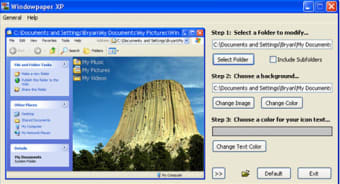
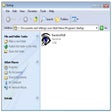
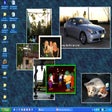
In Windows 98, this was a standard function although in Windows XP onwards, Microsoft seem to have mysteriously removed it. There, these developers have designed a tool which uses any picture of your choice as the background for a particular folder. It is very easy to use - simply select the folder you want to customize, choose the photo you want to place in it and you're done. You can undo any changes within the main program so you can experiment o your heart's content. You can use photos in the most common formats (BMP, JPG, GIF) and preview the results in real time on the program interface. Be warned however that it's best to use small resolution images and big ones can take ages to render and can actually slow your folders down. You can also modify all the folders within a folder by checking the "include subfolders" option so that you don't need to go through every single one separately.
A very nice little utility that performs a function that still should come as standard in Windows anyway. it's not essential but it makes your folders look much cooler.
Explore Stunning Minecraft Wallpapers for Windows
Free Wallpaper App for Windows Users
Enhance Your Desktop with XP Gloss Wallpaper Pack
Do you like to customize your desktop with wallpaper? Why stop there? With Windowpaper XP, you can put wallpaper in the back of any window�just like your desktop.
That's why we call it Windowpaper XP, because "it makes a better door than your window."

Free
Windows
Windows XP
English
30.1K
4.72 MB
View an ad to download for free
1 reviews
Review.
Comment.
Why not for windows 7?. it is amazing....but unfortunately it is not compatible with windows 7...do something. I really miss Pros: it is adorable Cons: not cons at all
Free
Bring Los Santos to Life on Your Desktop
Free
Bring life to your screen display
Free
Seamless trading environment for Windows users
Free
A Free Desktop customization program for Windows
Free
Taskbar personalization utility for Windows
Explore Stunning Minecraft Wallpapers for Windows
Free Wallpaper App for Windows Users
Enhance Your Desktop with XP Gloss Wallpaper Pack
Enhance Your Desktop with Dream Wallpaper
Dynamic Wallpaper Management Tool for Windows
Cherry Blossoms: A Beautiful Windows Theme
A Free Desktop customization program for Windows
Pebbles and soap bubbles on your XP's screen
Freshen up the appearence of Windows XP
Freshen up your desktop with 18 new styles
Enhance Windows with SphereXP Personalization Tool
Build your own icons and mouse pointers
Mac-up your Windows experience
Create icons in one click
A free Desktop customization program for Windows
View snow piling up on your windows
Customize your PC icons in a few clicks
Manage your applications Linux style
MMD3: A Free Personalization Tool for Windows
Present your favorite pictures in a unique way on your desktop